
What is Fetch TV?
FetchTV is a single source of all types of entertainment featuring live television, premium television, movies, streaming software and recorded content into a single easy-to-use interface. Rather than using many applications and controllers, Fetch is used to merge all the information into one menu with universal search and recommendations powered by the cloud.
The service needs the internet connection and Fetch device (mini or mighty) and monthly Fetch Access Pass ($3.99/month). It is then possible to add Content Packs, subscribe to premium channels, or just use it as a central location with Netflix, Disney+, Prime Video, Apple TV+, and Stan, Paramount+, and more.
FetchTV is the first-of-its-kind; it is antenna-free, flexible, and an easy-to-use streaming and TV viewing method that does not require a contractual commitment.
Features
- Universal Search: Make a single request to search live TV, applications, and movies.
- Voice Control: Search your Fetch and access content with the help of simple voice commands.
- Mobile App: Watch TV shows, videos, and films both on and offline.
- Multiroom: Share content across multiple Fetch devices with no added payments.
- Reverse TV Guide: Scroll back up to 24-48 hours to be able to immediately watch shows one has missed.
- Streaming Apps Integration: Netflix, Disney+, Prime Video, Paramount+, Stan, Apple TV+.
- Pause/Rewind Live TV: Can be used on the Mighty to have real-time control of the TV.
- Record Multiple Channels: Recording to 6 channels concurrently on the Fetch Mighty.
- Movie & TV Store: Rent or buy new movies and TV shows every month.
- Consistent Updates: Updates on software make the device sleek and contemporary.
- Antenna-Free Viewing:Free-to-air has optional use of an antenna; it allows viewing of most content in their entirety on the internet.
- Content Packs: Add Kids, Vibe, Knowledge, Variety, or Ultimate Pack.
FetchTV Packages & Pricing
Fetch uses a simple subscription model:
Base Access
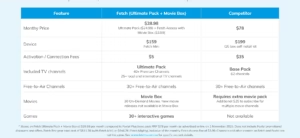
- Fetch Access Pass: $3.99/month
- One-time activation: $5
- Fetch device: One-time purchase (Mighty or Mini)
Content Packs (optional)
Introduce premium channel packages at a minimum of $7.99/month, which include:
- Kids Pack
- Knowledge Pack
- Vibe Pack
- Variety Pack
- Ultimate Pack (bundle)
Every pack is no lock-in, in order to add or remove any time.
Movies & Shows
- Rent or purchase new movies on the Fetch Movie Store.
- More than 30+ package-based movie channels.
- Movie Box incorporates monthly rotating movies.
FetchTV Devices (Mini vs Mighty)
Fetch provides two key devices, both of which are available to the same content ecosystem.
1. Fetch Mini
A small and low-priced streaming hub.
Key Highlights
- Live TV, streaming applications, game and content packages.
- Reverse TV Guide for catch-up
- Easy navigation and universal search.
- Unlike the other devices, this one is ideal in informal streamers or second-room streaming.
2. Fetch Mighty
The premium powerhouse for home entertainment.
Key Highlights
- Everything the Mini offers
- Record up to 585 hours of TV
- Pause, rewind, and fast-forward live TV
- Reverse TV Guide
- Best for families or power users
FetchTV Setup Guide
Setting up FetchTV is straightforward, even for first-time users.
Step 1: Connect the Device
- Plug your Fetch Mini or Mighty into your TV via HDMI
- Connect to power
- Optional: hook up an antenna (in case you desire free to air channels)
Step 2: Connect to Internet
Choose one of the following:
- Wi-Fi
- Optional: hook up an antenna (in case you desire free to air channels)
Step 3: Activate Your Account
- Log in or register for a Fetch account.
- Pay the one-time $5 activation
- Activate your $3.99/month Fetch Access Pass
Step 4: Log Into Streaming Apps
Use your existing subscriptions:
- Netflix
- Disney+
- Prime Video
- Paramount+
- Stan
- Apple TV+
…and more.
Your FetchTV is now ready to stream, watch, play, and record.
FetchTV Pros & Cons
| Pros | Cons |
|---|---|
| Affordable entry cost & no contract | Must buy device separately |
| Universal search across all apps | Recording only available on Mighty |
| Voice-enabled remote | Requires consistent internet |
| Multiroom support with no extra fees | Some apps may require separate subscriptions |
| Excellent movie store & content packs | One-time activation + monthly Access Pass |
| Easy to navigate interface | Antenna needed for some free-to-air channels |
Alternatives
- Foxtel Now
- Kayo Sports
- Binge
- Google TV / Apple TV 4K
- Amazon Fire TV
Conclusion
Yes, FetchTV serves any purpose of a person who wishes to have an affordable, flexible, and convenient entertainment solution. Universal search, streaming application integration, premium channel packages, recordings (including the Mighty), and a clean interface make it the best fit in the majority of households in Australia.
No contracts, cheap per month and you can personalize your experience depending on what you watch. No matter whether you are a casual streamer or a heavy TV viewer, FetchTV is a good offer in comparison to Foxtel and other bundled services.
FAQs
Does FetchTV require an antenna?
No, but an antenna is optional if you want local free-to-air channels.
How much is FetchTV per month?
$3.99/month for the Access Pass, plus optional content packs starting from $7.99/month.
Where can I buy FetchTV devices?
From Telstra, JB Hi-Fi, Harvey Norman, Kogan, The Good Guys, and more.
Can I record live TV?
Yes—only on the Fetch Mighty, with up to 585 hours of storage.
Does FetchTV support multiroom?
Yes, and there are no extra monthly fees for linking devices.